For teams of 2–10 technicians
Keep the office and the field on the same page.
Review incoming requests, plan confirmed visits, and assign the technician. Keep the customer, appointment, and work record connected as your team grows.
See It in Action- Plan tomorrow before the phone rings
- Review requests against working hours and unavailable dates.
- Assign the next visit clearly
- Keep the technician assignment and appointment with the work order.
- Avoid repeating the job details
- Let the field team return to property notes and arrival instructions.
Daily planning
Plan the week and assign the next visit.
Review appointment status, set recurring availability, and connect each technician assignment to the work order.
- Weekly availability
- Confirmed appointments
- Technician assignments
Product screens use example data.

Business control
Keep the details available when the job changes hands.
Technicians can review their assigned work and customer arrival instructions. The office can return to the request, customer details, proposal, and payment record.
- Field job details
- Property & visit notes
- Work approvals
- Invoice & payment state
Reporting, subscriptions, and Coverage depend on your account setup and available services. Contact CORTAN to discuss the features your business needs.
Review contractor capabilities and questions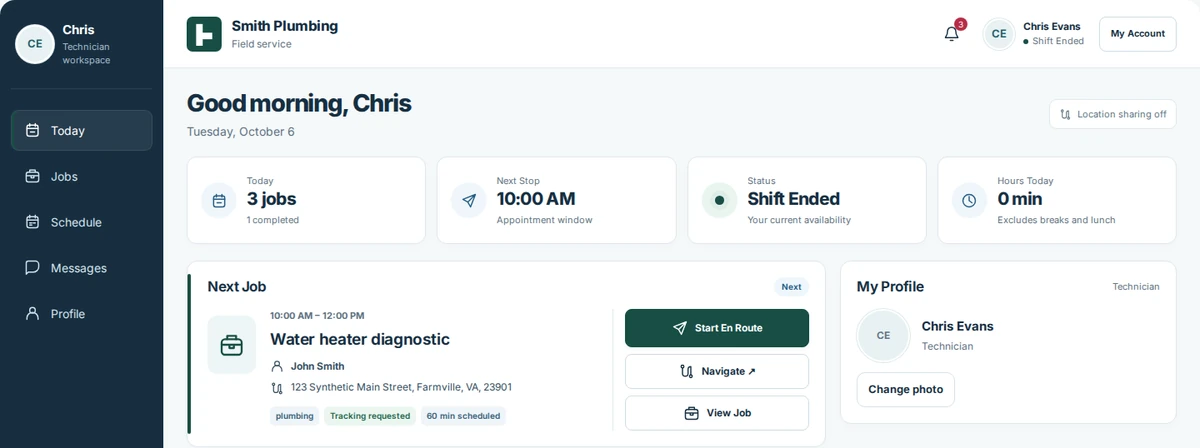
Guided onboarding
Get started with a focused onboarding plan.
Start with your business, your customers, and a clear setup plan.
Get StartedPlan your setup before you begin.
- Share six business details.
- Agree on setup, pricing, and payment-provider terms.
- Set up your workspace and invite existing customers.
Applying does not activate billing or guarantee acceptance. We review your business requirements and explain pricing and payment setup before onboarding.
Review the pricing approach →CORTAN Connect for your business.
Choose the way you work.